Media & Entertainment
The Emmys Chooses Drupal 7
For those who watched the Primetime Emmys last night the content management system (CMS) used to support the website probably didn't matter all that...
A lot of what's written about performance tuning for Drupal is focused on large sites, and benchmarking is often done by requesting the same page over and over in an attempt t

A lot of what's written about performance tuning for Drupal is focused on large sites, and benchmarking is often done by requesting the same page over and over in an attempt to maximize the number of requests per second (à la ab). Unfortunately, this differs from the real world in two key ways:
In this post I'll model a site with 500 nodes, and 1200 hits per day. That's fewer than 1 request per minute, yet for many small businesses this would be a fairly healthy traffic flow. In this case, it might at first seem that high performance doesn't matter. A clever hacker could probably manage to install Linux on the office coffee maker and get acceptable HTTP throughput. However, latency still matters a great deal, even for small sites:
User impatience is measured in units of 1 tenth of a second starting at 200 milliseconds or so.
Drupal's page cache is capable of delivering blazing fast response times, but only when the cache is warm. And the reality for most small to mid-sized sites is the page cache is being cleared out far quicker than it's regenerated.
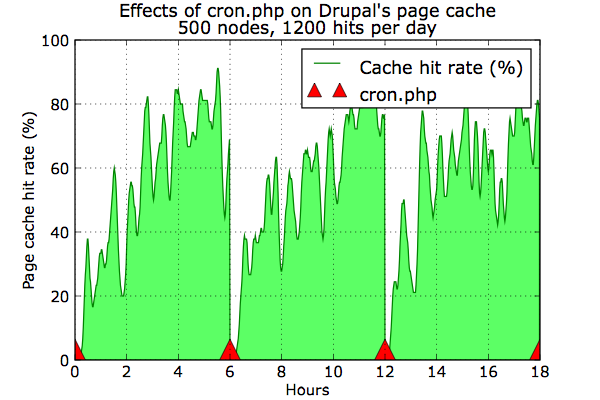
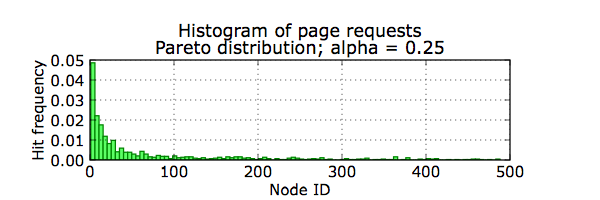
These graphs show what happens to a site that runs cron.php every six hours. Remember, system_cron() calls cache_clear_all(), and every time the cache is cleared the hit rate crashes to zero. The traffic follows a Pareto distribution: a few pages are very popular with a "long tail" of less common requests. Initially the hit rate jumps back up as the popular pages get cached. But the "long tail" pages never really gain an acceptable hit rate before it starts all over again. To make matters worse, I've seen site operators that run cron far more often – imagine if cron were run every fifteen minutes; there would be almost no page caching at all. So what can be done?
Somewhere between six hours and one day is likely adequate for most sites. If you have tasks than need to run more often (such as notifications), consider breaking up your cron runs with Elysia cron or perhaps a drush script. Still, as the graph shows it can take a long time for the page cache to kick in no matter what the frequency. Furthermore, the cache is also cleared during other operations such as node edits or comment posting.
Almost every smart Drupal developer I've discussed this problem with has the same answer: run a crawler. I'm not thrilled about this solution because in some ways it seems very inefficient; but some testing shows the impact can be minimal. In my tests 500 nodes took less than a minute to regenerate from a cold cache; and less than 5 seconds when fetching from the cache. This assumes you have the XML Sitemap module installed. While not required, a sitemap certainly make's wget's job easier.
wget --quiet http:∕∕example.com∕sitemap.xml --output-document - |\
perl -n -e 'print if s#</?loc>##g' | wget -q --delete-after -i -
It seems the ideal cache handler would regenerate cache entries before they expire, sadly as far as I know this doesn't exist yet for Drupal 6. (There's Pressflow Preempt for D5, but it seems it never made it to D6). If you have ideas about this please let me know!
For those who watched the Primetime Emmys last night the content management system (CMS) used to support the website probably didn't matter all that...
Performance benchmarks for Drupal caching solutions reveal Boost as the top choice for small sites, emphasizing the importance of efficient cache...
If you contribute patches to the Drupal issue queues, you often spend a lot of time and hard work getting that patch through the review process.